Potentiometer with ESP32 DOIT DevKit v1 – Step-by-Step Tutorial

Introduction
A potentiometer (often called a pot) is a variable resistor that allows you to adjust resistance manually by rotating its knob. It is commonly used for volume control, brightness adjustment, and sensor calibration.
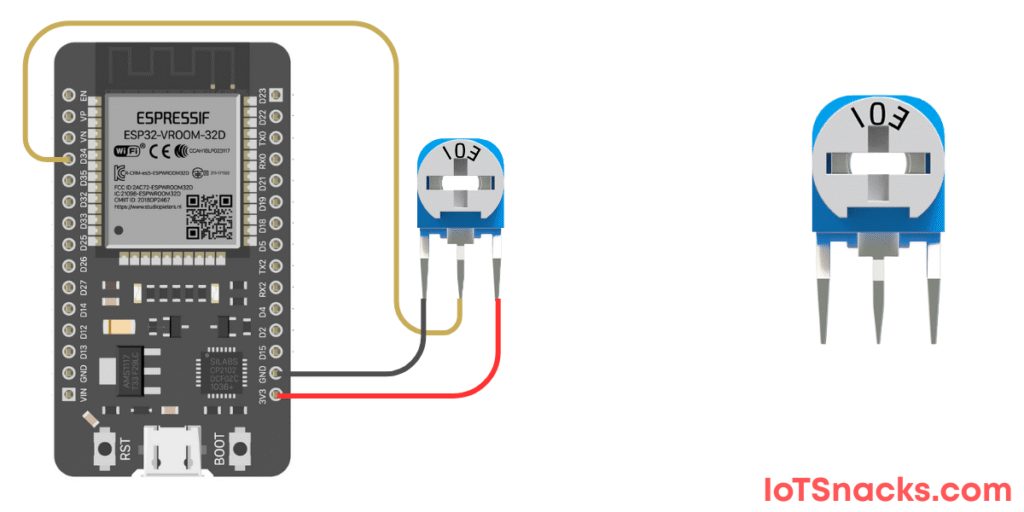
When connected to an ESP32, a potentiometer works as a voltage divider, giving an analog output that the ESP32 can read. In this tutorial, we’ll connect a potentiometer to GPIO 34 of ESP32 DOIT DevKit v1 and read its values in the Serial Monitor.
Components Required
- ESP32 DOIT DevKit v1
- Potentiometer (10kΩ recommended)
- Breadboard and jumper wires
- USB cable
Circuit Diagram
- Potentiometer VCC pin → 3.3V
- Potentiometer GND pin → GND
- Potentiometer middle pin (wiper) → GPIO 34
Arduino Code
// Potentiometer with ESP32 DOIT DevKit v1
// Pot connected to GPIO 34

int potPin = 34;   // Potentiometer connected to ADC pin
int potValue = 0;  // Variable to store Pot value

void setup() {
  Serial.begin(115200);  // Start Serial Monitor
}

void loop() {
  potValue = analogRead(potPin); // Read Pot value (0-4095)
  Serial.print("Potentiometer Value: ");
  Serial.println(potValue);
  delay(500); // Small delay for stability
}
Step-by-Step Code Explanation
Define Variables
int potPin = 34;
int potValue = 0;
- Assign GPIO 34 for potentiometer input.
potValuewill hold the sensor readings.
Setup Serial Monitor
Serial.begin(115200);
Starts serial communication to display potentiometer values.
Loop Function
potValue = analogRead(potPin);
Serial.println(potValue);
- Reads the potentiometer analog value (0–4095 range).
- Prints it in the Serial Monitor.
- Rotating the knob changes the value.
Output
- Open Serial Monitor (115200 baud).
- Rotate potentiometer knob → Values increase or decrease depending on direction.
- Left = Lower values (close to 0).
- Right = Higher values (close to 4095).
Real-Life Applications
- Volume Control → in radios, amplifiers.
- Light Dimmer → adjust brightness of LEDs.
- Servo Position Control → control angle of servos.
- Sensor Calibration → fine-tuning sensor thresholds.
- User Input Device → knob-based user interface in IoT projects.
Troubleshooting
| Problem | Cause | Solution |
|---|---|---|
| Values always 0 | Wrong wiring | Connect middle pin to GPIO 34 |
| Values unstable | Loose connections | Use good breadboard/jumpers |
| Reads only max value | Wrong supply | Connect pot to 3.3V, not 5V |
| Serial not showing | Wrong baud rate | Set 115200 in Serial Monitor |
What is the ADC range of ESP32?
ESP32 gives 0–4095 (12-bit resolution) for analog inputs.
Can I connect potentiometer to 5V instead of 3.3V?
No, ESP32 works at 3.3V logic. Use 3.3V to avoid damage.
Can I use potentiometer to control LED brightness?
Yes ✅, read pot value and map it to LED PWM duty cycle.
How many potentiometers can I connect to ESP32?
ESP32 has multiple ADC pins, so you can connect several potentiometers.
Can I get exact resistance values from ESP32?
No, ESP32 reads voltage (0–3.3V) as ADC values, not resistance directly.