LDR (Light Sensor) with ESP32 DOIT DevKit v1 – Step-by-Step Tutorial

Introduction
An LDR (Light Dependent Resistor) is a sensor that changes its resistance based on light intensity:
- In bright light, its resistance is low (more current flows).
- In darkness, its resistance is high (less current flows).
By connecting the LDR to an analog input pin of ESP32, we can measure the light intensity and use it in IoT projects. In this tutorial, we’ll connect the LDR to GPIO 35 of ESP32 DOIT DevKit v1 and display the sensor values in the Serial Monitor.
Components Required
- ESP32 DOIT DevKit v1
- LDR sensor
- 10kΩ resistor (for voltage divider)
- Breadboard and jumper wires
- USB cable
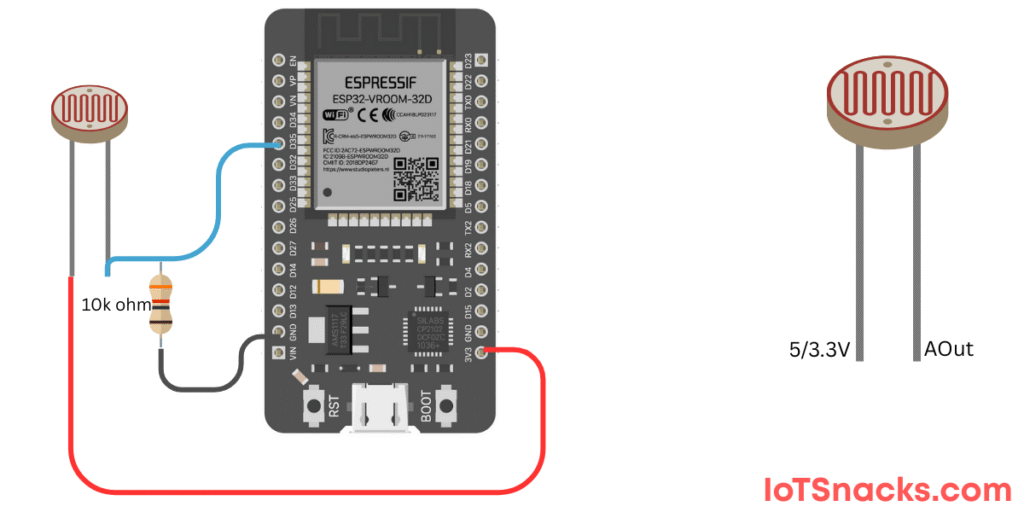
Circuit Diagram
- One end of LDR → 3.3V
- Other end of LDR → GPIO 35
- Also connect 10kΩ resistor between GPIO 35 and GND
⚠️ This forms a voltage divider circuit, allowing ESP32 to read varying light levels as an analog value.
Arduino Coe
// LDR with ESP32 DOIT DevKit v1
// LDR connected to GPIO 35

int ldrPin = 35;   // LDR connected to ADC pin
int ldrValue = 0;  // Variable to store LDR reading

void setup() {
  Serial.begin(115200);  // Start Serial Monitor
}

void loop() {
  ldrValue = analogRead(ldrPin); // Read LDR value (0-4095)
  Serial.print("LDR Value: ");
  Serial.println(ldrValue);
  delay(500); // Small delay for stability
}
Step-by-Step Code Explanation
Define Variables
int ldrPin = 35;
int ldrValue = 0;
- Assign GPIO 35 for LDR input.
- Create variable
ldrValueto store sensor readings.
Setup Serial Monitor
Serial.begin(115200);
Starts serial communication to display sensor values.
Loop Function
ldrValue = analogRead(ldrPin);
Serial.print("LDR Value: ");
Serial.println(ldrValue);
- Reads LDR analog value (range: 0–4095 on ESP32).
- Prints it to the Serial Monitor.
- Higher value = more light, lower value = less light.
Output
- Open the Serial Monitor (115200 baud rate).
- Cover the LDR → Values decrease (darkness).
- Shine a light → Values increase (brightness).
Real-Life Applications
- Automatic Street Lights – turn ON in darkness, OFF in daylight.
- Smart Home Systems – adjust lighting based on room brightness.
- Solar Tracking Systems – detect sunlight intensity for solar panels.
- Energy Saving Devices – dim/brighten lights automatically.
Troubleshooting
| Problem | Cause | Solution |
|---|---|---|
| Constant value (no change) | Wrong wiring | Check LDR + resistor connections |
| Values always HIGH | No voltage divider | Ensure 10kΩ resistor connected to GND |
| Flickering values | Noise in sensor | Add small capacitor (0.1µF) across LDR & resistor |
| Serial Monitor not showing | Wrong baud rate | Use 115200 baud in Arduino IDE |
What is the ADC range of ESP32?
ESP32’s ADC gives values from 0 to 4095 (12-bit resolution).
Can I connect LDR directly without resistor?
No, you need a voltage divider with a resistor to read proper values.
Can ESP32 read multiple LDRs?
Yes, ESP32 has multiple ADC pins, so you can connect several LDRs.
Can I use 5V for LDR instead of 3.3V?
No, ESP32 is 3.3V logic. Using 5V may damage it.
How can I use LDR values to control a light?
You can add a condition in code: if light < threshold → turn ON LED/relay.